Go-Live
After completing production environment configuration, you can release the application and officially go live.
Release Application
Release your application in Copilot to make it enter production state:
-
Enter Application Management
- Go to application details page
- Confirm all configurations are complete
-
Release Application
- Click “Release” button
- Application status will change to “Released”
-
Application Status Management
- Released: Application normally accepts transactions
- Disabled: Application no longer accepts new transactions
- You can disable the application at any time to pause transaction processing
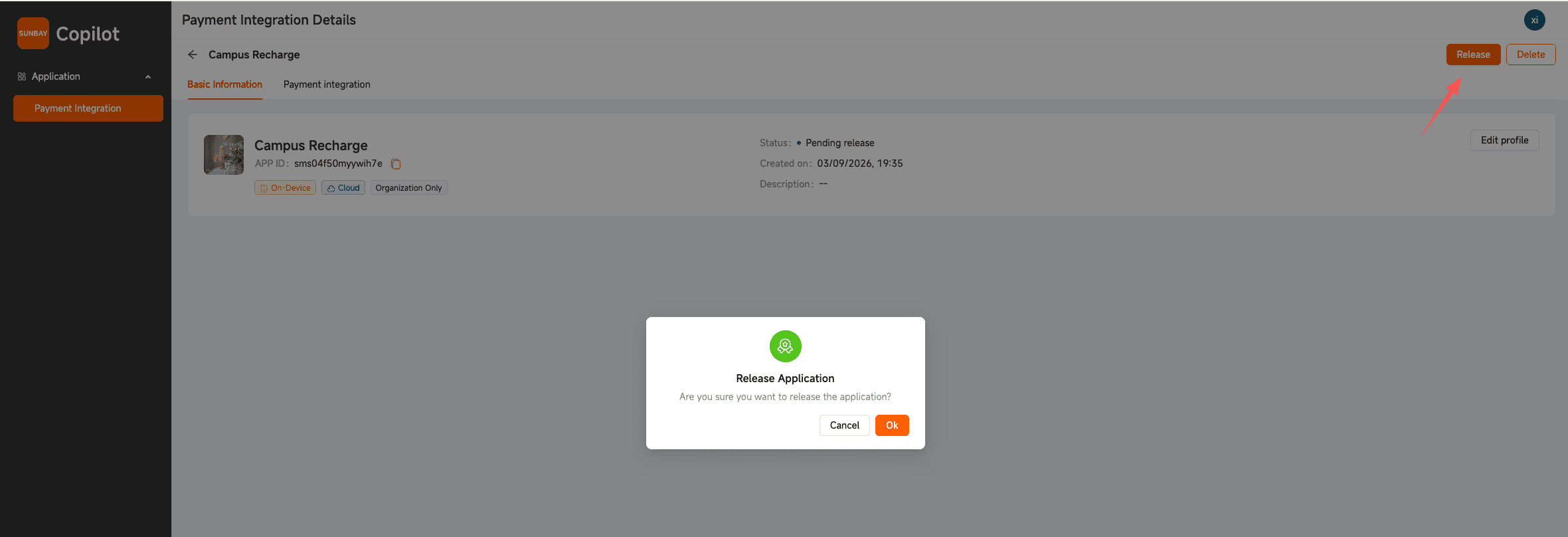
After disabling the application, the application will not be able to perform any transaction operations, including payment, query, and refund.
Go-Live Testing
Before officially opening business, conduct small amount real transaction testing:
-
Execute Test Transactions
- Use real card numbers to initiate small amount payments
- Verify payment process completeness
- Confirm transaction data is recorded correctly
-
Verify Webhook Notifications
- Confirm receipt of payment success notification
- Verify notification content is complete and accurate
- Check signature verification is normal
-
Test Refund Process
- Initiate refund for test transactions
- Verify refund process is normal
- Confirm refund notification receipt is normal
-
Test Query Function
- Query transaction details
- Verify data consistency
- Confirm query response is normal
Production environment testing will incur real fees, it is recommended to use small amounts for testing and refund promptly.
Real-time Monitoring and Alerting
Establish a comprehensive monitoring system to ensure stable system operation:
-
API Monitoring
- Monitor API call success rate
- Track API response time
- Record error rate and error types
- Set exception alert thresholds
-
Transaction Monitoring
- Monitor transaction success rate (recommended > 98%)
- Track transaction amount and number
- Identify abnormal transaction patterns
- Set transaction failure alerts
-
System Monitoring
- Monitor server resource usage (CPU, memory, disk)
- Track network connection status
- Monitor application health status
- Set system exception alerts
-
Webhook Monitoring
- Monitor Webhook receipt success rate
- Track Webhook processing time
- Record Webhook retry count
- Ensure response time < 5 seconds
Recommended Monitoring Tools:
- Application Performance Monitoring: New Relic, Datadog, Prometheus
- Log Analysis: ELK Stack, Splunk, Grafana Loki
- Alert Notification: PagerDuty, Slack, Email
Technical Support
Contact SUNBAY technical support promptly when encountering problems:
-
Support Channels
- Contact your account manager or sales representative
- For emergencies, call the hotline provided by your account manager
-
Problem Feedback Information
- Application ID and Merchant ID
- Problem occurrence time
- Transaction ID, order number, or traceId
- Error messages and logs
- Problem reproduction steps
-
Response Time
- General issues: Response within 1 business day
- Urgent issues: Response within 2 hours
- System failures: Immediate response
Go-Live Checklist
Before officially opening business, please confirm the following items:
- ✅ Application has been released and is in “Released” status
- ✅ Small amount real transaction testing passed
- ✅ Webhook notification receipt is normal
- ✅ Refund process testing passed
- ✅ Monitoring and alerting system configured
- ✅ Log recording and analysis tools ready
- ✅ Team members understand emergency procedures
- ✅ Technical support contact information filed
Best Practices
Gradual Rollout: When business volume is large, it is recommended to first open 10% traffic for observation, gradually expand to 30%, 50%, 100%, closely monitor key metrics at each stage.
Error Handling: Query APIs can be automatically retried, transaction APIs (payment, refund) are prohibited from automatic retry to avoid duplicate charges.
Performance Optimization: Use connection pools to manage HTTP connections, set reasonable caching strategies, asynchronously process non-critical business.
Security Hardening: Use HTTPS encrypted communication, securely store API keys (environment variables or key management services), regularly rotate keys, do not log sensitive information (complete card numbers, CVV).
Regular Maintenance: Review monitoring reports weekly, analyze transaction data monthly, regularly update dependency libraries, apply security patches promptly.
Emergency Handling
Transaction failure rate suddenly increases: Check SUNBAY API service status → View application error logs → Verify network and keys → Contact technical support
Webhook receipt failure: Check service running status → Verify URL accessibility → Check signature verification logic → View Copilot send logs
API response timeout: Check network connection → View server resources → Optimize database queries → Consider increasing resources
System exception requires rollback: Disable application in Copilot → Rollback to previous stable version → Verify system is normal → Analyze problem cause
FAQ
Can configuration be modified after application release?
Yes. You can modify application security configuration (such as keys, IP whitelist, etc.) at any time, changes take effect immediately. However, it is recommended to make configuration changes during business off-peak hours.
Will disabling the application affect existing transactions?
Yes. After disabling the application, all transaction operations will not be possible, including new transactions, queries, and refunds. Please operate with caution.
How to perform gradual rollout?
Gradual rollout needs to be implemented at your application layer for traffic control, can be controlled through load balancers, API gateways, or application code to control traffic distribution ratio.
How to quickly locate problems in production environment?
- View application logs to confirm error messages
- View transaction details and API call logs in Copilot
- Check monitoring metrics to identify abnormal patterns
- Contact technical support, provide transaction ID and error logs
How often should keys be updated?
It is recommended to update keys once a year. If key leakage is discovered, update immediately. The system supports key rotation, old keys will be retained for a period of time to ensure smooth switching.
How to improve system availability?
- Deploy multiple application instances to achieve load balancing
- Use health checks and automatic restart mechanisms
- Configure comprehensive monitoring and alerting
- Establish emergency response procedures
- Regularly conduct failure drills
Congratulations! 🎉 You have successfully completed the go-live of SUNBAY payment system.
Next Steps:
- Continuously monitor system operation status
- Regularly review transaction data and monitoring reports
- Optimize system performance according to business needs
- Follow SUNBAY product updates and new features
- Contact technical support anytime if you have questions