Solution Overview
Tapro semi-integration solution provides payment access capabilities for third-party POS applications through Taplink SDK (local integration) and Nexus SDK (cloud integration), supporting flexible deployment for same-device and cross-device scenarios.
Solution Features
- Quick Integration - Simplify access process through SDK, reduce development difficulty
- Flexible Deployment - One SDK supports both same-device and cross-device scenarios
- Unified Structure - Local mode and cloud mode maintain consistent data structure
Product Architecture
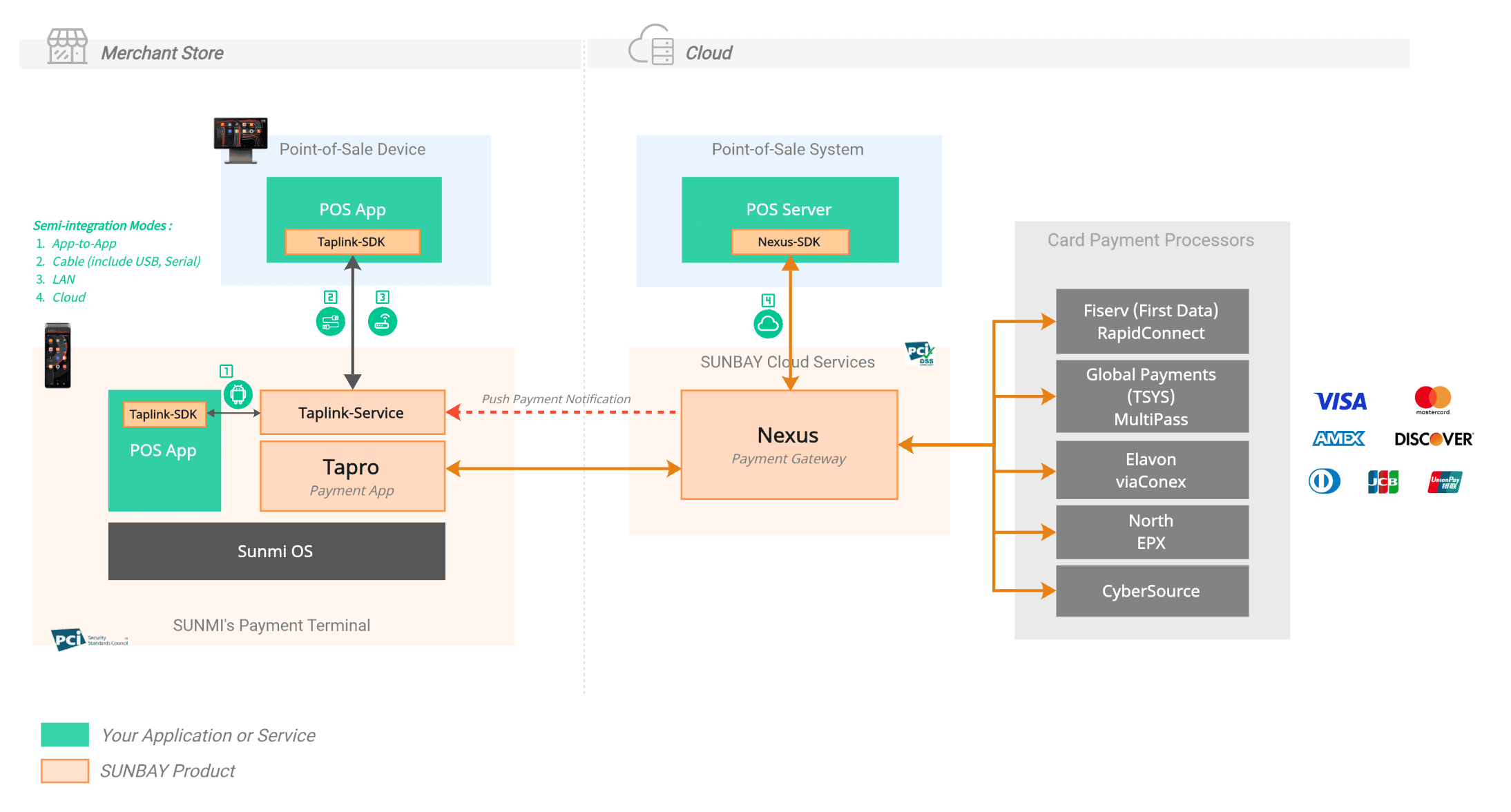
Core Components
Taplink SDK (Local Integration)
Positioning: Taplink SDK (Local Integration)
Supported Platforms:
- ✅ Android (currently supported)
- 🚧 Windows, iOS (planned)
Core Functions:
- Encapsulate complete payment call API
- Handle local connection communication (Cable, LAN/WLAN)
- Automatic reconnection and exception handling
- Device discovery and pairing management
Nexus SDK (Server-side)
Positioning: SUNBAY payment gateway server-side interface
Integration Methods:
- Nexus SDK (recommended): Java, Node.js, Python, PHP, Go, .NET
- Nexus API: Direct RESTful API calls, supports any programming language
Functions:
- Receive payment requests from POS applications
- Push payment instructions to specified payment terminals
- Return payment results and transaction status
Integration Method Comparison
| Integration Method | Connection Mode | Description |
|---|---|---|
| On-Device | App-to-App Mode | POS and Tapro run on the same Android device, communicate via Intent |
| Cross-Device | Cable Mode | Physical cable connection, cross-device communication |
| LAN Mode | LAN connection, cross-device communication | |
| Cloud Mode | Merchant backend calls via Nexus API, Nexus pushes to payment terminal |
On-Device Integration (App-to-App Mode)
Applicable Scenarios
POS application and Tapro application run on the same device
Technical Solution
- Launch Tapro application through Android Intent mechanism
- Use Taplink SDK to encapsulate call logic
- Inter-process communication (IPC), millisecond-level latency
Typical Devices
Android all-in-one, Android tablet, Android handheld terminal
Note: App-to-App mode currently only supports Android platform. Will support Windows, iOS and other platforms in the future.
Connection Flow
Cross-Device Integration
Cable Mode
Applicable Scenarios
POS application runs on non-financial device, calls independent payment terminal through local connection
Supported Connection Types
| Connection Type | Protocol | Applicable Scenario | Technical Features |
|---|---|---|---|
| USB AOA | Android Open Accessory 2.0 | Android ↔ Android | Plug and play, system-level support |
| USB-VSP | USB Virtual Serial Port (CDC-ACM) | Windows ↔ Android | Simulated serial port, baud rate 115200 |
| RS232 | Standard RS232 serial communication | Traditional POS ↔ Payment terminal | Hardware serial port, configurable baud rate |
Connection Flow
In Development: Cable Mode functionality is under development and will be available soon.
LAN Mode
Protocol
WebSocket over TLS (WSS)
Security Mechanism
- Transport Encryption: TLS 1.2+
- Port Strategy: Random port (8443-8453), displayed through Tapro interface
- Message Integrity: HMAC-SHA256 signature
- Session Management: 24-hour validity period
Device Discovery
- First Connection: User manually enters IP + port
- Automatic Update: mDNS broadcast (service name:
_taplink._tcp.local) - Dynamic Adaptation: Automatically handles IP changes caused by DHCP
Typical Devices
Desktop POS, Tablet, Kiosk self-service device
Connection Flow
Cloud Mode
Applicable Scenarios
Merchant server-side calls payment capabilities through SUNBAY payment gateway
Technical Solution
- Merchant server-side integrates Nexus SDK or directly calls Nexus API
- Nexus pushes payment instructions to specified terminal
- Wake up Tapro application to complete payment
Transaction Flow
View Cloud Integration Detailed Documentation →
Unified Transaction Flow
Regardless of which integration method is used, the transaction processing flow remains consistent:
Choose Integration Method
Local Integration vs Cloud Integration
| Comparison Item | Local Integration | Cloud Integration |
|---|---|---|
| Network Requirements | LAN/Cable | Internet connection |
| Response Speed | Fast (local communication) | Medium (via cloud) |
| Multi-terminal Management | Need to connect one by one | Unified management |
| Applicable Scenarios | POS and terminal at same location | POS in cloud or multi-store |
| Development Difficulty | Medium | Low (using SDK) / Medium (direct API calls) |
Decision Recommendations
Choose Terminal Integration if:
- ✅ POS application and terminal at same location
- ✅ Need fast response, low latency
- ✅ Single store or few stores
Choose Cloud Integration if:
- ✅ POS system deployed in cloud
- ✅ Need unified management of multi-store, multi-terminal
- ✅ Need centralized data analysis and reports
- ✅ Using SaaS platform architecture
Hybrid Deployment: You can also adopt different integration methods in different stores. For example, headquarters uses cloud integration for unified management, individual stores use local integration to improve response speed.
Security and Compliance
General Security Mechanism
Permission Verification:
- Check if application has corresponding transaction permissions
- Restrict application to only execute authorized transaction types
Data Security:
- Sensitive card number information automatically masked
- Complies with PCI DSS data security standards
Local Integration Security
Connection Authentication:
- Use App ID and Client Secret for identity verification
- HMAC-SHA256 signature verification
Transaction Security:
- Transaction message signature verification to prevent data tampering
- LAN mode uses TLS 1.2+ encrypted transmission
Cloud Integration Security
API Authentication:
- Use API Key for identity verification
- Support Webhook signature verification
Data Transmission:
- HTTPS encrypted transmission
Compliance Certification
- PCI DSS - Complies with PCI DSS Level 1 standard
- EMV - Passed EMV chip card certification